


✚
A full range of CS concepts
Students used sequences, loops, conditionals, events, operators, and variables in the games they built.[2]
EVIDENCE-BASED CODING
Hands-On Coding That Actually Works.
Makey Makey turns everyday objects into game controllers — and curious kids into confident programmers. Peer-reviewed research proves it.
THE CHALLENGE
You are expected to teach real coding to every student — on the budget, devices, and prep time you already have. The usual options fight you on all three. Screen-only apps lose the kids who learn by doing. Per-seat software renews its bill every year, for every student. And single-purpose robots cost a fortune to teach one thing, then sit in a closet.
Makey Makey was built for exactly this gap: hands-on coding that runs on the free software and the computers you already own — and, unlike most classroom tech, the results are peer-reviewed.
HIGH SCORE: MAKEY MAKEY DOUBLED LEARNING GAINS
In the research, students didn't memorize syntax — they made programs run. Kids traced real code by touching fruit wired to a Makey Makey, watching variables and outputs change with every step.
The payoff was measurable. Across grades 4–6, test scores more than doubled — 4th graders went from about 2 to nearly 6 out of 10 — a jump researchers rated a "huge" effect. It held in every grade and every teaching method, with less than a 0.1% chance it was luck. Students came away with six real computer-science concepts: sequences, loops, conditionals, variables, inputs, and outputs.[1]
WHAT THAT LOOKS LIKE
In a second study, a middle-schooler named Marcus remixed a Scratch fish game with a Makey Makey controller he built himself. He set a rule that his fish wins at size 105, made it grow and score every time it ate a smaller fish, and coded it to lose if it hit the seaweed first. That's variables, conditionals, and events — real programming, driven by a kid who just wanted his game to work.
— Lee, Kafai, Vasudevan & Davis, 2014[2]
THE RESEARCH
A second peer-reviewed study followed middle-schoolers as they remixed Scratch games and built their own Makey Makey controllers. Five things stood out.Lee, Kafai, Vasudevan & Davis · Springer, 2014.[2]
Students used sequences, loops, conditionals, events, operators, and variables in the games they built.[2]
Tangible interfaces were "more inviting, better for collaboration, with broad appeal across genders."[2]
Designing games fostered computational thinking — and the motivation to keep programming.[2]
Building for a game arcade pushed kids to iterate and debug their own code.[2]
Makey Makey needs no drivers, no special software, and no prior coding.[2]
FROM THE FOUNDER OF SCRATCH
…you line up things in the physical world, and then write programs to turn those things in the physical world into different actions, whether it’s musical actions or graphical actions on the screen.
— Mitch Resnick
LEGO Papert Professor of Learning Research, MIT Media Lab · Founder of Scratch
BLOCK-BASED CODING
Students drag-and-drop colorful blocks to build games, stories, and animations — then use Makey Makey to control them in the real world.
One device. Every platform.
Makey Makey works just like a keyboard and mouse — pressing the arrow keys, space bar, W/A/S/D, and click. So anything a student codes to respond to those inputs works instantly. No drivers. No installs. No special software.
Ages 8+ · Free · No login
We offer a variety of preconfigured apps our on site ready to use. Pre-coded apps that work the second you connect — a piano, bongos, drums, and games. No code, no login, nothing to install. And also Scratch apps. One click to "See Inside" opens the real code — so students can peek at how it works and remix it. An easy on-ramp from playing to programming.

Ages 8+ · Free · MIT
The world's most popular block language and Makey Makey's go-to partner. Kids build games, animations, and interactive stories in the browser, then bring them to life with their inventions.

Ages 5–7 · Free
Scratch's little sibling for the youngest coders. Picture-based blocks need no reading, so pre-readers can snap together their first interactive stories and games.
Ages 8+ · Free
Code retro games in MakeCode Arcade, then use the keymapping guide to invent your own custom Makey Makey controller. Blocks flip to JavaScript and Python as students grow.

Ages 5–14 · Curriculum
A structured K-8 curriculum that grows with students from blocks to Python and JavaScript. Covers game design, robotics, and Minecraft modding, with teacher dashboards built for the classroom.

Ages 4+ · Free
Free, standards-aligned courses used in schools worldwide, plus the famous Hour of Code. Its block-based lessons pair naturally with a Makey Makey.
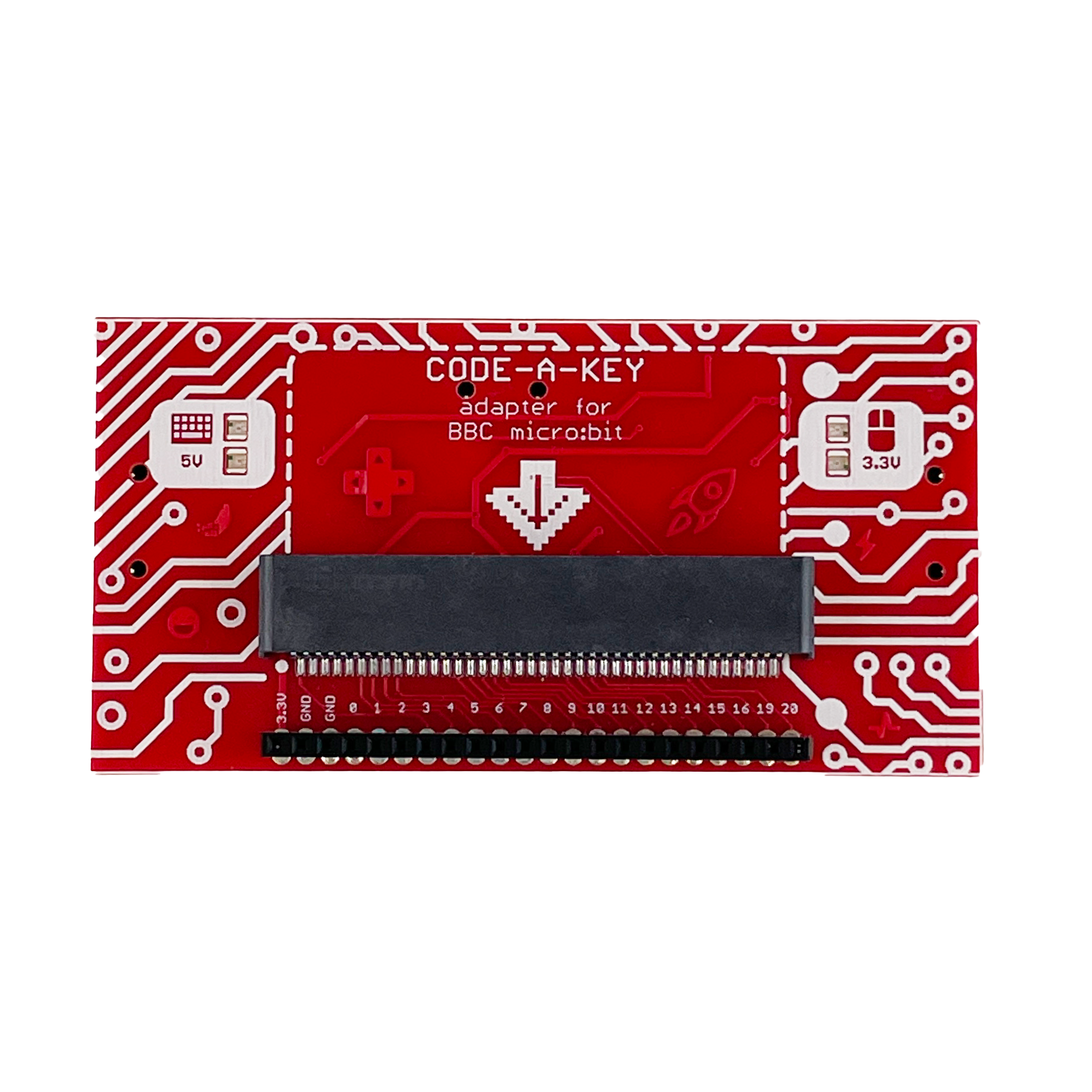
Grows with your students
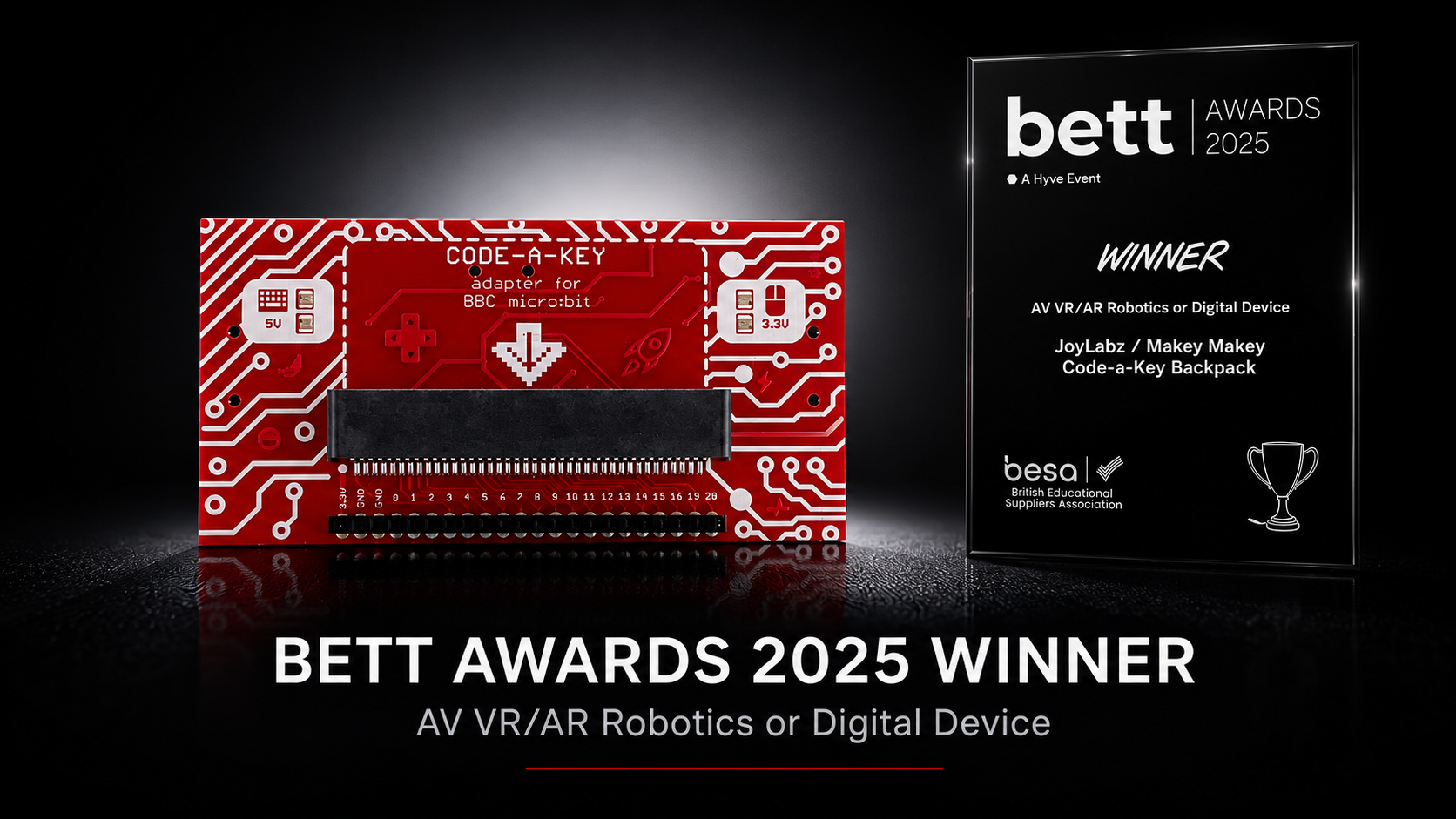
Once students are confident with block-based coding, the Code-a-Key Backpack snaps a BBC micro:bit onto their Makey Makey — unlocking sensors, physical computing, and more advanced programming in Microsoft MakeCode.
Works with Makey Makey v1.5+. micro:bit and Makey Makey sold separately.
TEACHING RESOURCES
Projects, videos, and full lesson plans — all free, all classroom-ready.
ALLIGATOR CLIP ACADEMY
Step-by-step coding lessons filtered by topic, difficulty, and grade level.
Browse the Academy →VIDEO RESOURCES
316+ videos sorted by subject — Scratch tutorials, project walkthroughs, and classroom inspiration.
Watch coding videos →FREE RESOURCES
Beginner Scratch, MakeCode Arcade, and plug-and-play activities, plus the Certified Educator Workshop.
Visit Educator Hub →BUILT FOR SCHOOLS & DISTRICTS
Evidence-based outcomes, the lowest possible barrier to entry, and a fit with the standards you already teach.
Independent, published studies show significant, large-effect learning gains — not just engagement.
A one-time purchase pairs with free coding platforms — no per-seat software licenses or recurring fees.
Plug-and-play over USB on the computers and Chromebooks you already own. No drivers, no installs.
Directly supports computational thinking: sequences, loops, conditionals, variables, inputs & outputs.
Research notes tangible making is more collaborative with broad appeal across genders and diverse learners.
One toolkit spans ScratchJr at age 5 through Python in MakeCode and Tynker by middle school.

Makey Makey adapts to diverse needs — the Perkins School for the Blind publishes Makey Makey STEM activities and lesson plans for students who are blind or visually impaired. Hands-on, tactile coding meets students where they are.[13]
COMING SOON
A complete K–8 coding curriculum is on the way. Sign up and we will email you the moment it is ready to download.
AWARD-WINNING
Trusted by classrooms worldwide and honored by the people who know learning tools best.
Best of STEM
BETT Educators' Pick · 2024
Toy of the Year
Finalist · 2016

Best of Toy Fair
Popular Science · 2014
Bett Award
Code-a-Key Backpack · 2025
READY TO INVENT?
Outfit a single class or an entire district. Makey Makey makes the leap into computer science hands-on, joyful, and proven.
REFERENCES
Numbered footnotes throughout the page link here. Peer-reviewed studies are labeled [S1] and [S2]; [C] is the standard reference for the Cohen's d effect-size benchmark.
Statistics on this page summarize findings reported in [S1] and [S2]. Effect sizes follow Cohen's d (≥ 0.8 = large).