


Overview
Makey Makey Classic
Products
Grades 2–10
Grade Level
45 minutes
Time Required
Plug and Play
Category
Difficulty
CSTA Standards
CCSS Standards
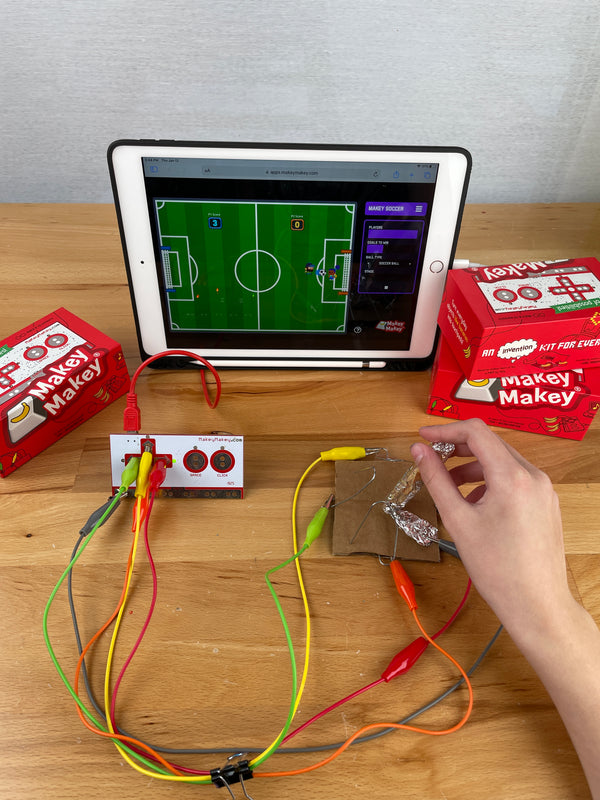
Learn about joystick history and create multiple types of game controllers — from Play-doh D-pads to scrappy paperclip joysticks — to play the Makey Makey Soccer app!
Learning Goals
- Learn the history of joystick and game controller design
- Create a Play-doh D-pad controller for 4-directional input
- Build a scrappy joystick from paperclips, foil, and cardboard
- Iterate on controller design through testing and prototyping
Materials & Preparation
Materials Needed
- Makey Makey kit
- Alligator clips
- Play-doh
- Paper clips
- Cardboard (3x3 inch squares)
- Aluminum foil
- Cardstock
- Tape
Preparation
Open the Makey Makey Soccer app at apps.makeymakey.com. Pre-cut cardboard squares and cardstock pieces. Have Play-doh available at each station.
Build Activity — Step by Step
Play-doh D-pad
Create four Play-doh contacts for up, down, left, and right. Clip alligator clips to paper clips pushed into each Play-doh piece to keep clips clean.
Wire the D-pad
Connect each Play-doh pad to the corresponding arrow input on Makey Makey. Connect EARTH. Test with the Soccer app!
Build Joystick Base
Unfold a paperclip to 90 degrees and push it through a 3x3 inch cardboard square. Tape the large end flat on the bottom — this is your joystick base.
Add the Joystick Stick
Roll a 3x3 inch piece of cardstock into a tube, wrap it in foil (leave extra foil at the bottom), and place it on the paperclip base. Clip EARTH to the foil.
Create Direction Contacts
Bend 4 paperclips at 90 degrees, push them into the cardboard around the joystick — one for each direction. Shape them so the foil joystick can touch them when tilted.
Invention Challenge
Now design your OWN controller! What materials will you use? How will the player close the circuit? Follow the design cycle: imagine, plan, create, test, improve, share!
Assessment
Students play the Soccer app with their custom controller and present their design process. Evaluate controller functionality, creative problem-solving, and iteration based on testing feedback.