


Overview
Makey Makey Classic
Products
Grades 4–12
Grade Level
20 minutes
Time Required
Accessibility Guides
Category
Difficulty
CSTA Standards
CCSS Standards
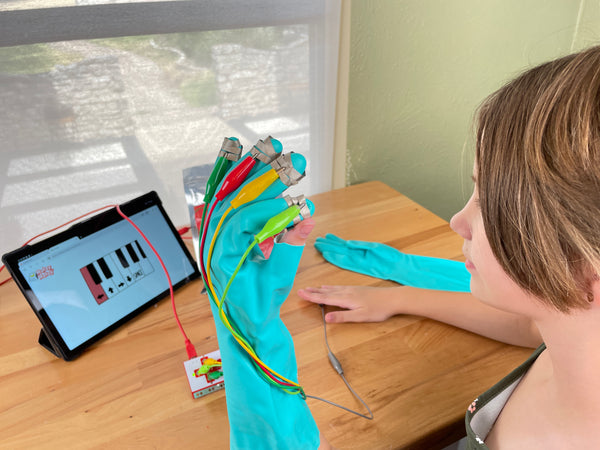
Build a wearable glove controller for Makey Makey! Add conductive fingertips to a glove so users can control apps by touching surfaces — great for accessibility and adaptive play.
Learning Goals
- Understand accessibility needs in technology design
- Build a wearable controller using a glove and conductive materials
- Create multiple input points on a single wearable device
- Discuss how adaptive technology empowers users with different abilities
Materials & Preparation
Materials Needed
- Makey Makey kit
- Alligator clips
- Glove (cotton or knit)
- Aluminum foil or conductive fabric
- Conductive thread (optional)
- Tape
Preparation
Have gloves in various sizes available. Pre-cut foil patches for fingertips. Discuss accessibility concepts and why adaptive controllers matter.
Build Activity — Step by Step
Prepare the Glove
Choose a glove that fits comfortably. Identify which fingertips will control which Makey Makey inputs.
Add Conductive Fingertips
Wrap the tips of each finger with aluminum foil or conductive fabric. Secure with tape, keeping the conductive surface exposed on the outside.
Wire to Makey Makey
Clip alligator clips from each conductive fingertip to a different Makey Makey input. Route wires along the back of the hand and up the arm.
Add the Ground Connection
Create a conductive wristband or palm pad connected to EARTH. The wearer naturally grounds themselves when wearing the glove.
Test and Play
Wear the glove and touch conductive surfaces, other people, or touch pads to trigger inputs. Try playing games, music, or controlling Scratch projects!
Assessment
Students demonstrate their glove controller and discuss how it could help someone with limited mobility interact with technology. Evaluate construction quality, accessibility thinking, and empathy.