

Overview
Makey Makey Classic
Products
Grades 4–12
Grade Level
45 minutes
Time Required
Maker Class
Category
Difficulty
CSTA Standards
CCSS Standards
Use Scratch sequencing and secret codes to create an interactive life cycle project with Makey Makey! Learn about variables, sequencing, and biological life cycles.
Learning Goals
- Code sequential logic using variables in Scratch
- Create an interactive life cycle display (butterfly, frog, plant, etc.)
- Design conductive touch points for each life cycle stage
- Implement secret code logic — touch stages in the correct order
Materials & Preparation
Materials Needed
- Makey Makey kit
- Alligator clips
- Poster board or cardboard
- Aluminum foil or conductive tape
- Art supplies for life cycle illustrations
- Computer with Scratch
Preparation
Students should research a life cycle before class. Set up Scratch on all computers. Prepare example life cycle images for inspiration.
Build Activity — Step by Step
Choose a Life Cycle
Pick a life cycle to illustrate — butterfly, frog, plant, water cycle, rock cycle, or any sequential process.
Draw the Stages
Illustrate each stage of the life cycle on poster board. Add conductive foil touch points to each stage.
Code in Scratch
Create a Scratch project with sprites for each stage. Use variables to track which stage the user is on.
Add Secret Code Logic
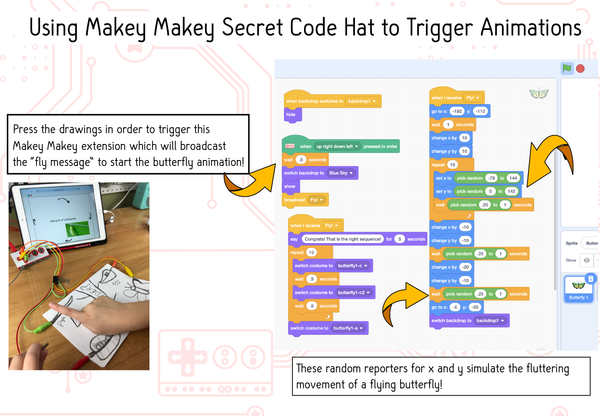
Program Scratch so the stages must be touched in the correct order. If touched out of order, play an error sound. If correct, animate the transition!
Connect and Test
Wire each foil touch point to a Makey Makey input. Test the full sequence — can you complete the life cycle in order?
Assessment
Students present their interactive life cycle project, demonstrating the correct sequence and explaining the Scratch code logic. Evaluate coding skills, science accuracy, and design.