


Overview
Makey Makey Classic
Products
Grades 3–12
Grade Level
30–45 minutes
Time Required
Musical Guides
Category
Difficulty
CSTA Standards
CCSS Standards
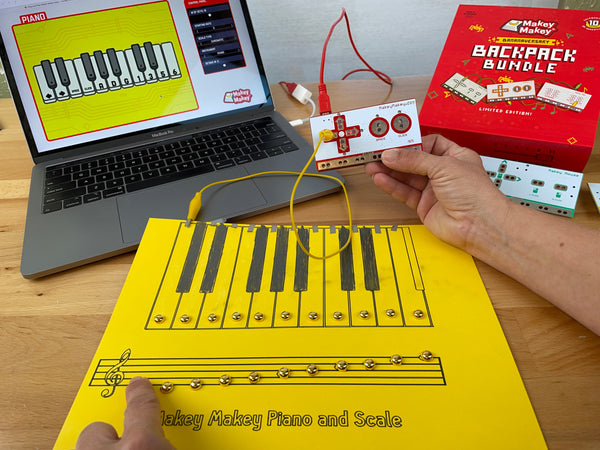
Build a full-size interactive piano using the Makey Makey Piano app! Create large conductive keys from foil and cardboard that play real musical notes when stepped or touched.
Learning Goals
- Design large-scale conductive keys for a floor piano
- Understand how to scale up a Makey Makey project
- Use the Makey Makey Piano app with remapped keys
- Troubleshoot connections at scale with multiple inputs
Materials & Preparation
Materials Needed
- Makey Makey kit
- Alligator clips (extra long recommended)
- Large sheets of cardboard
- Aluminum foil
- Tape
- Computer with Makey Makey Piano app
Preparation
Clear a large floor area for the piano keys. Pre-cut cardboard rectangles for keys. Have extra-long alligator clips or extension wires available. Open the Piano app.
Build Activity — Step by Step
Plan Key Layout
Decide how many keys your piano will have (start with 5–7). Cut cardboard rectangles large enough to step on — about 8x12 inches each.
Add Foil Surfaces
Cover each cardboard key with aluminum foil. Make sure the foil is smooth and extends past the edges for alligator clip connections.
Create the Ground Strip
Make a long foil ground strip that runs along the front of all keys. The player will stand on this to stay grounded.
Wire Everything Up
Connect each key's foil to a Makey Makey input. Connect the ground strip to EARTH. Use extension wires if keys are far from the board.
Configure the Piano App
Open the Makey Makey Piano app and adjust the scale, octave, and number of keys to match your physical piano.
Play and Perform
Step on the ground strip and touch or step on keys to play notes! Try playing a simple melody like 'Mary Had a Little Lamb.'
Assessment
Students perform a melody on their floor piano and explain the wiring diagram. Evaluate scale of construction, wiring reliability, and musical performance.