


Overview
Makey Makey Classic
Products
Pre-K – 12+
Grade Level
Up to 1 hour
Time Required
Everyday Inventing
Category
Difficulty
CSTA Standards
CCSS Standards
Build a playable cardboard guitar and connect it to Makey Makey! Strum conductive strings to trigger notes from the Piano app, Sampler, or your own Scratch project.
Learning Goals
- Design and build a functional cardboard instrument
- Use conductive materials as guitar strings
- Connect a physical instrument to digital sound apps
- Experiment with different sounds and musical scales
Materials & Preparation
Materials Needed
- Makey Makey kit
- Alligator clips
- Cardboard box (shoebox works great)
- Aluminum foil
- Rubber bands
- Conductive tape or wire
- Computer with Piano or Sampler app
Preparation
Collect cardboard boxes of various sizes. Pre-cut foil strips for strings. Open the Makey Makey Piano app or Sampler app on each computer.
Build Activity — Step by Step
Build the Guitar Body
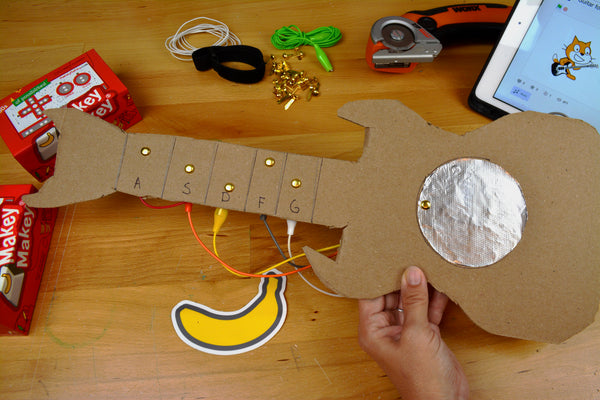
Use a cardboard box as the guitar body. Cut a sound hole in the center. Attach a cardboard neck to one end.
Add Conductive Strings
Stretch strips of aluminum foil or conductive tape across the sound hole to act as guitar strings. Keep each string separate!
Create the Ground Strip
Add a foil strip along the neck or body that connects to EARTH. The player must touch this while strumming.
Wire to Makey Makey
Connect each foil string to a different Makey Makey input (arrows, space, click). Connect the ground strip to EARTH.
Choose Your Sounds
Open the Piano app for musical notes, or use the Sampler to record your own sounds — guitar chords, voice samples, or sound effects!
Rock Out!
Hold the ground strip with one hand and strum the foil strings with the other to play your cardboard guitar. Experiment with different sounds and scales!
Assessment
Students perform a short song or demonstration on their cardboard guitar and explain the circuit connections. Evaluate instrument construction, creativity, and understanding of how the circuit works.